
Building an Accessible WordPress Website for an Australian NDIS Care Provider
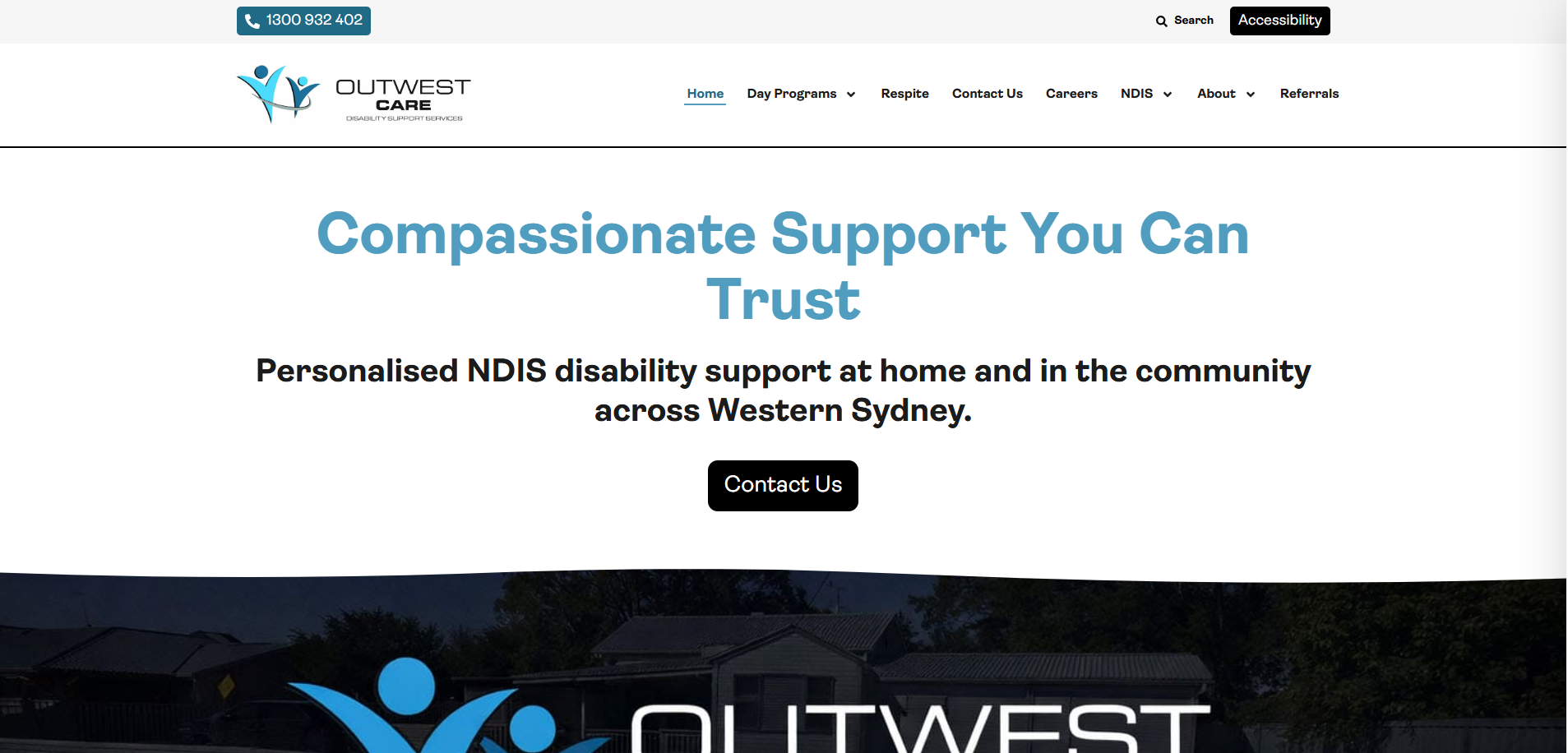
Most websites are built for people who can see clearly, use a mouse precisely, and read standard body text without difficulty. For a disability support and NDIS care provider, that assumption fails a significant portion of the exact people the organisation exists to serve. When Chris from Outwest Care came back with a second project after the Simply Doors and Windows build, the brief was different from anything we had worked on before — build an accessible WordPress website for an Australian NDIS registered provider, with a working accessibility toolbar as the single most important feature. This post covers how we built it, why accessibility toolbars matter for care sector websites, and what any NDIS or disability support organisation needs to know before commissioning their own site.
The Client and the Problem
Who They Were
Outwest Care Pty Ltd is an Australian NDIS registered provider offering community lifestyle support, social connection programs, and disability support services in the Hawkesbury region of New South Wales. The organisation was launching a new website to replace an existing basic site at outwestcare.com.au, with a design reference from afford.com.au — a larger Australian disability support provider with a polished, accessible, content-rich website structure.
The scope included migrating all existing content from outwestcare.com.au into the new site structure, building all pages from the existing site in the new design, and adding a purpose-built landing page for a new service: the Hawkesbury Dementia-Specific Hub — a specialised day program for people living with dementia offering memory and cognitive support, art and creative expression sessions, gentle exercise, and sensory engagement activities.
The Single Most Important Requirement
Chris was explicit about the priority: "THE MOST IMPORTANT PART is the Accessibility button, to allow the website to change as people select certain modes of the website." The reference was a floating accessibility toolbar — the kind that allows visitors to switch to high contrast mode, increase text size, enable dyslexia-friendly fonts, reduce motion, or activate screen reader optimisation with a single click. For a disability support provider whose website visitors include people with visual impairments, cognitive disabilities, and mobility challenges, this is not a cosmetic feature. It is a functional requirement that directly determines whether the site is usable by the people it is trying to reach.
This type of accessibility-first build is exactly the kind of specialist work I handle through my custom WordPress development services at CodeSyte. Building an accessible website for a care sector client requires understanding both the technical implementation and why it matters to the end user.
What I Proposed
$490 Fixed, 9-Day Delivery
After reviewing both reference sites and the existing outwestcare.com.au content, the project was scoped as a full WordPress build using Elementor Pro for layout, WPForms for all contact and enquiry forms, and WPOneTap Pro for the accessibility toolbar. The design reference from afford.com.au provided the visual direction — a clean, warm, professional layout suited to a community care audience with clear service navigation, program descriptions, and prominent contact CTAs.
The scope covered all pages from the existing Outwest Care site plus the new Hawkesbury Dementia-Specific Hub landing page, with content migrated and restructured to match the new design system. The site would be built on a private staging environment and migrated to the client's GoDaddy hosting on approval — the same approach used on the earlier Benchmark Custom Homes project.
The Build Process
Elementor Pro Layout — Styled After afford.com.au
The afford.com.au reference provided a clear visual benchmark: warm colours, large imagery, clear program cards, prominent navigation, and a content structure designed for an audience that may be less digitally confident. Each page was built to match this warmth and clarity — avoiding dense text blocks, using generous whitespace, and ensuring every CTA was immediately visible without scrolling.
Content from outwestcare.com.au was restructured into the new layout. Service pages, about content, program descriptions, and contact information were all migrated and reformatted to match the new design system. The Hawkesbury Dementia-Specific Hub page was built as a dedicated landing page with the full brief content — program tiles for Memory and Cognitive Support, Art and Creative Expression, Gentle Exercise and Movement, and Specialised Dementia Activities — each presented as a clear icon-led card with bullet point descriptions. A WPForms registration of interest form was placed prominently at the base of the page.
The Accessibility Toolbar — WPOneTap Pro
The accessibility toolbar was the most technically specific requirement of the project. The free version of WPOneTap did not include the full feature set needed — specifically the labelled dropdown modes that matched the reference Chris had provided. After confirming this with the client, Chris provided the WPOneTap Pro licence key and plugin file directly.
Once the Pro plugin was installed and activated, the toolbar was configured with the full set of accessibility modes: high contrast, dark mode, text size increase, dyslexia-friendly font, reduced motion, cursor enlargement, and screen reader optimisation. The toolbar was positioned as a floating button visible on all pages, labelled clearly, and styled to match the site's brand palette while remaining visually distinct enough to be immediately noticed by visitors who need it.
For any NDIS or disability support website, the accessibility toolbar is not optional. The National Disability Insurance Scheme serves participants with a wide range of conditions — many of which directly affect how a person interacts with a digital interface. A site without accessibility accommodations is actively excluding people it is meant to serve. This is why accessibility implementation is part of my WordPress performance and compliance services at CodeSyte.
WPForms Integration
All contact and enquiry forms across the site were built using WPForms as specified. The Hawkesbury Dementia-Specific Hub page received a Register Your Interest form with fields for name, phone number, email, and a message field for additional context. General contact forms were placed on the Contact page and relevant service pages. All forms were tested for submission routing before delivery.
GoDaddy Migration
Following client review and approval of the staging build — with minor layout adjustments confirmed via screenshots — the site was migrated to the client's GoDaddy hosting environment. The migration was completed cleanly and the site went live at the production URL. Chris confirmed the site was live shortly after migration was completed.
The Result
What Was Delivered
- Full WordPress website built with Elementor Pro, styled to afford.com.au reference
- All pages from outwestcare.com.au migrated and restructured into the new design
- Hawkesbury Dementia-Specific Hub landing page built with full brief content and program tiles
- WPOneTap Pro accessibility toolbar configured with full mode set — high contrast, dyslexia font, text size, reduced motion, screen reader optimisation
- WPForms integration across all contact and enquiry pages
- Register Your Interest form on the Dementia Hub landing page
- NDIS Registered Provider badge and Outwest Care logo placed correctly per brief
- GoDaddy migration completed — site confirmed live by client
- Fully mobile responsive across all pages
Client Confirmation
After the staging review Chris confirmed: "Great job — just a couple of small changes." After migration and go-live: "Yes, website is live. Thank you. I will have a new project for you soon." The project was the second in a series of engagements with Chris across different client organisations — demonstrating the kind of ongoing relationship that comes from consistent delivery quality and clear communication.
Key Takeaway for NDIS and Care Sector Websites
Accessibility Is a Functional Requirement, Not a Feature
For most business websites, an accessibility toolbar is a nice-to-have enhancement. For an NDIS registered provider serving people with visual impairments, cognitive disabilities, and physical conditions that affect computer use, it is a baseline requirement. The people visiting an Outwest Care website are — by definition — more likely than the general population to need high contrast mode, larger text, reduced motion, or screen reader support. Building the site without these accommodations would mean the website actively fails its intended audience.
WCAG 2.1 (Web Content Accessibility Guidelines) compliance is increasingly expected for organisations in the disability and aged care sector in Australia. An accessibility toolbar addresses the front-end user experience layer. True WCAG compliance also covers underlying code structure — alt text on all images, correct heading hierarchy, keyboard navigation support, and colour contrast ratios meeting AA or AAA standards. If your organisation serves people with disabilities and your website does not have an accessibility strategy, that is the most important thing to address before any other digital marketing investment.
Dementia-Specific Content Requires Careful Layout Decisions
The Hawkesbury Dementia-Specific Hub page served a specific secondary audience: family members and carers researching support options for a person living with dementia. This audience is often under significant stress and needs information presented clearly and compassionately — not in dense paragraphs, not in jargon-heavy clinical language, and not buried behind multiple navigation clicks. Building the page with clear program tiles, short bullet point descriptions, a warm visual tone, and a prominent enquiry form at the base was a deliberate choice driven by the audience's emotional state and information needs.
Repeat Client Relationships Come From Project-to-Project Consistency
The Outwest Care project was the second engagement with Chris — the first being Simply Doors and Windows, a completely different sector and build type. The repeat engagement happened because the first project was delivered to a clear standard, communication was consistent, and the client felt confident bringing a more complex and sensitive brief to the same developer. Building long-term client relationships is the most efficient way to grow a freelance development practice — and it starts with treating every project, regardless of budget, as if it is the one that determines whether the client comes back.
Final Thoughts
The Outwest Care website is a good example of what a properly built NDIS care provider website looks like — warm design, clear service pages, an accessible toolbar that works, and a purpose-built landing page for a new community program. The technical requirements were specific but well-defined, and the project moved efficiently from staging build to GoDaddy migration within the agreed timeline and budget.
If you run an NDIS registered provider, aged care organisation, or disability support service and need a WordPress website that is genuinely accessible — not just visually clean but functionally usable for your actual audience — that is exactly what I build at CodeSyte. Explore my full WordPress accessibility, healthcare, and community sector website services here, or get in touch directly for a review of your current site and accessibility status.