
How I Built a Custom Divi Blog Layout for a Netherlands City Guide
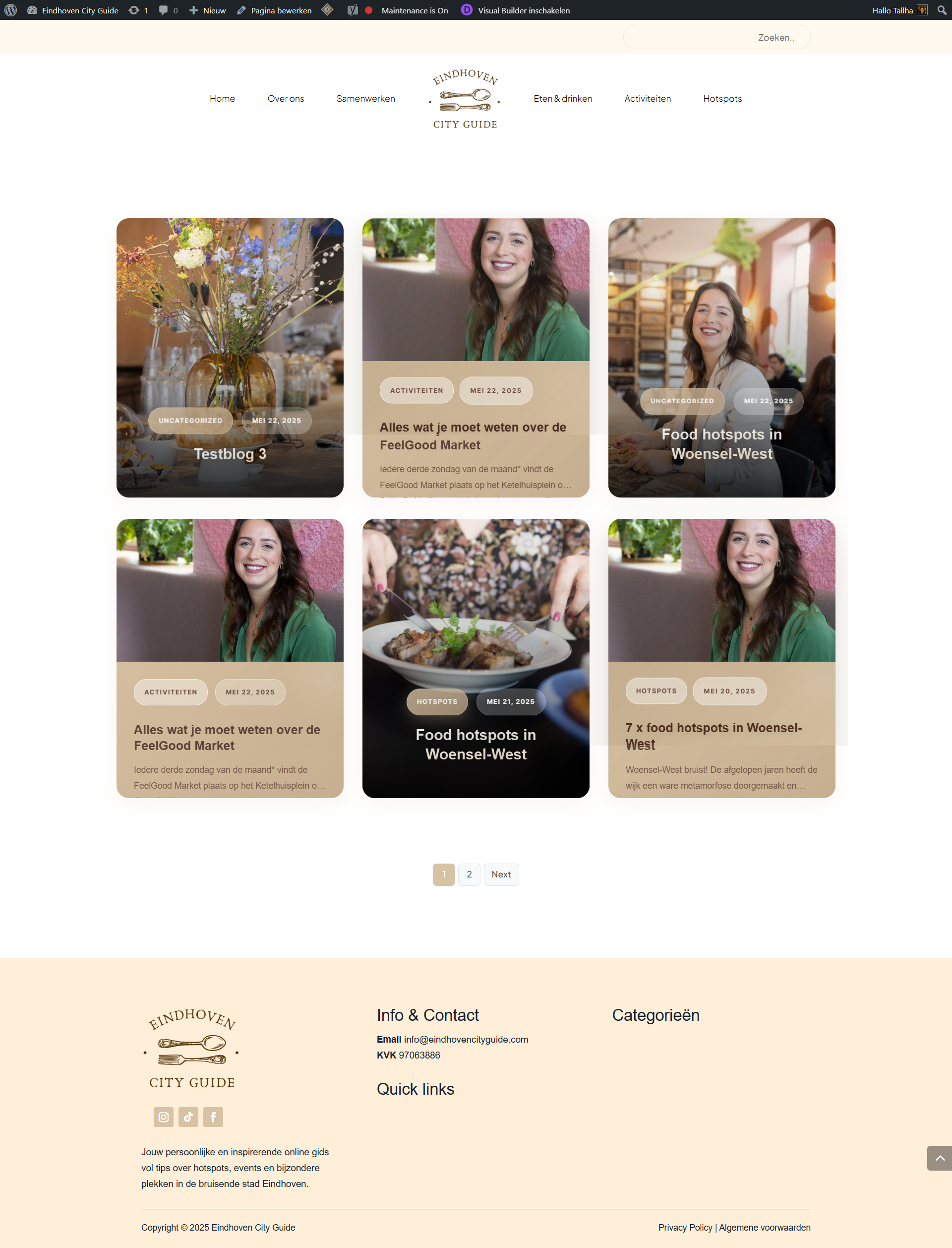
Divi is a flexible page builder, but it has limits. Sometimes a client hands you a design that the module library simply cannot produce. That was the case here. A web designer running the Eindhoven City Guide needed a custom Divi blog layout where the middle post looked different from the ones beside it, updated automatically, and worked across category pages too. Divi offered no native way to do it.
This post walks through the full project: the problem, what I proposed, the code decisions I made, and the honest back-and-forth of a build with many revisions. It is written for Divi users, web designers, and site owners who need a layout the builder does not support out of the box. If you have ever been told "Divi can't do that," this case study is for you.
The Client & The Problem
The client was a skilled web designer building the Eindhoven City Guide, a local guide website for Eindhoven in the Netherlands. She was comfortable in Divi but had hit a wall with one specific design.
On the homepage she wanted a block showing the three most recent blogs in a category, with the middle card styled differently from the two around it. She also wanted the same look on her blog category pages, pulling the featured image and post title dynamically.
Her honest expectation was that it might be a twenty-minute job. When she asked whether Divi could do it natively, my answer was direct: it could not. As I told her, "It's a custom layout, Divi doesn't offer that type of customization." She asked if code could solve it. It could — it would just take real time to build properly.
The core constraint was that the layout had to be fully dynamic. When she published a new post, the block needed to refresh on its own. Static HTML was never an option. This is exactly the kind of gap that thoughtful custom WordPress development is meant to fill.
What I Proposed
I proposed a code-based solution rather than a plugin patch. The plan was a custom layout where the first block carried an image and title, the second carried an image and excerpt, and the arrangement stayed dynamic across new posts.
We negotiated the scope openly. I quoted two days and $125 initially. She felt it was a little high, and I explained the price reflected genuine custom work. We settled at $110 over two days, which was fair for both sides. I never rushed the estimate down to one day, because I would rather deliver clean code than a broken deadline.
I also set the expectation that category pages would be handled through a reusable system, not one-off edits. That decision shaped everything I built next and is central to how I approach Divi customization work for clients who plan to scale their content.
The Build Process
Once she shared WordPress access and the homepage URL, I logged in and started. The build broke into three real challenges: the dynamic layout itself, the category system, and a long tail of visual refinements.
Tools and Approach
I used custom PHP to query and output the posts, custom CSS for the styling, and a Divi-friendly integration so the client could place the block herself. I packaged the logic into a shortcode-driven "Info Posts Control System" and documented it so she was never dependent on me for placement.
The shortcode approach mattered. Instead of hard-coding one block, I built something she could drop onto any category URL. As I explained to her, she could paste the shortcode into a category page and it would automatically fetch that category's posts. That reusability is the difference between a quick fix and a proper custom code solution.
Challenges and Decisions
The revisions were extensive and I welcomed them. She asked for bigger padding below titles, removal of a border and a top line on images, transparent backgrounds, and a specific colour of #d8c2a4 instead of the default blue. She wanted the fonts changed to "Eindhoven City Guide - Medium" for titles and Plus Jakarta Sans Light for body text.
Then came the harder logic requests. She wanted the whole card clickable, not just the title. She needed subcategories to show only their own posts, while main categories displayed everything beneath them. She wanted the Hotspots category and its subcategories excluded from the main blog page, and the date hidden for those specific categories only.
Each of these was a deliberate coding decision, not a checkbox. Handling a post that lived in two categories, for example, required careful query logic so nothing was duplicated or lost.
Honest Setbacks
The project was not frictionless, and I would not pretend otherwise. My login stopped working mid-build after the client accidentally deleted my profile, which she quickly restored. An Eid holiday period slowed one round of fixes, and I told her honestly to expect a short delay. A footer font conflict and a hover-state shadow issue each reappeared after being fixed, so I debugged them more than once until they held. Transparency during those moments kept her trust intact.
The Result
The final layout delivered exactly what she had sketched: a dynamic three-post block with a distinct middle card, fully clickable cards, category and subcategory filtering through a reusable shortcode, and clean typography matching her brand.
Her feedback through the project told the story. Early on she wrote, "It's looking so good!" Later came "Yes that's perfect!" and finally, "Thank you very much! Then I'm perfectly happy with everything you did."
The closing five-star review summed it up: "Tallhi exceeded my expectations: quick delivery, bug free and super professional. Better than expected and went above and beyond to make it perfect." A small $25 add-on for the final custom exclusion feature brought the total to $135, and the site was ready to launch. Reliable delivery like this is what I aim for on every WordPress project I take on.
Key Takeaway
The practical lesson is simple: Divi's limits are not your project's limits. When a design falls outside the module library, clean custom code can deliver it without breaking the builder experience for the client.
The second lesson is about structure. By turning the layout into a documented shortcode system, the client gained something reusable across pages and future sites, instead of a fragile one-off. Building for reuse costs a little more upfront and saves far more later.
Finally, honesty carries revision-heavy work. Setbacks happened, and naming them plainly kept the relationship strong through weeks of small changes. If you are weighing a similar build, that same transparent, code-first approach is what you get when you work with CodeSyte on Divi and WordPress.
If Divi is holding your design hostage, or you need a dynamic layout the builder cannot produce, I can help. Explore the full range of WordPress and Divi development services at CodeSyte and send over your design — let's turn "Divi can't do that" into a launched website.