
How I Built a Senior-Friendly WordPress Website With Elementor for a Dutch Health Platform
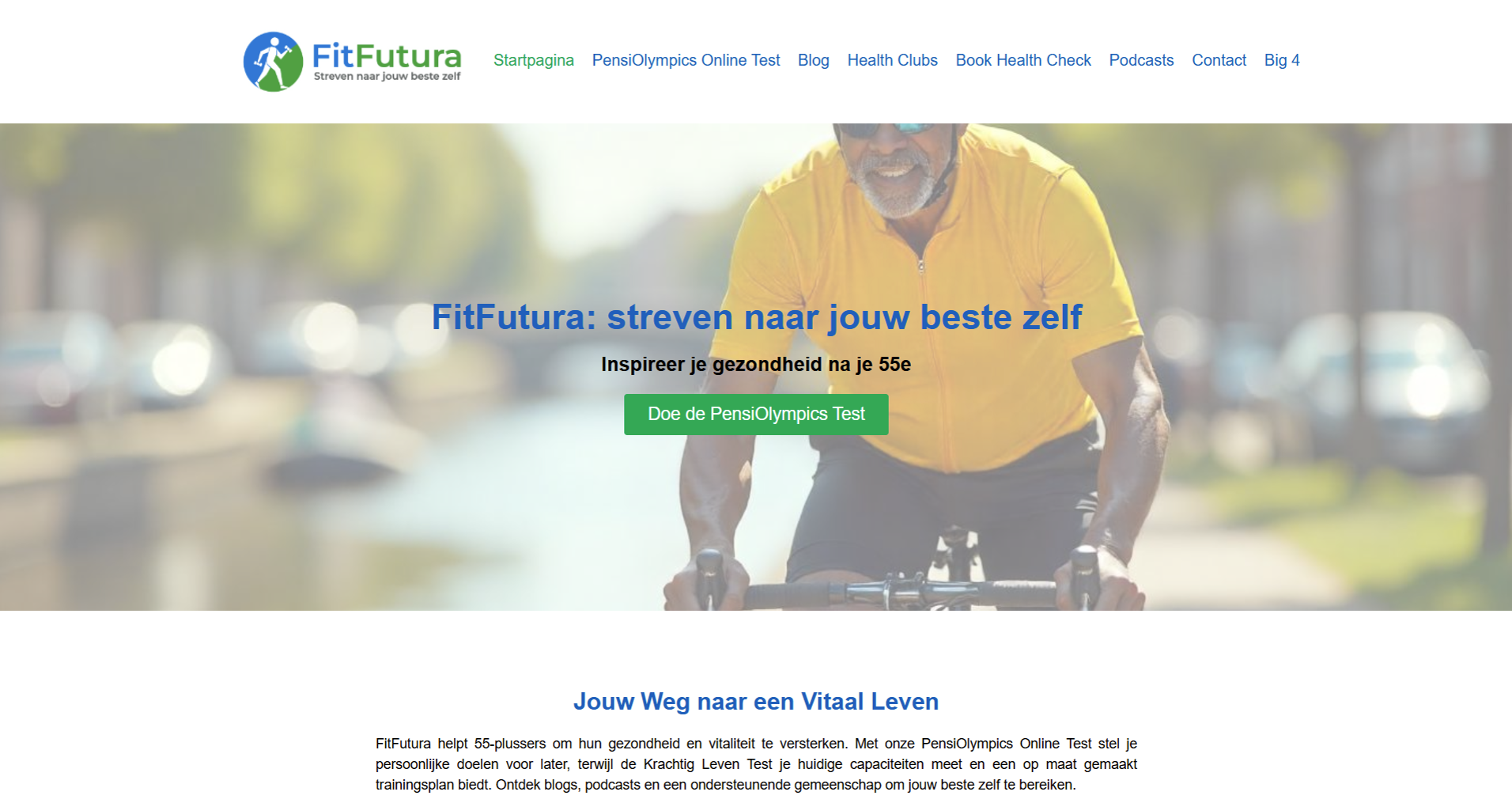
Most website briefs look simple until you read the fine print. A client wants "a small site," and buried in the instructions are booking systems, payment gateways, and multilingual support. That was exactly the situation when Jacques reached out to me on Fiverr for FitFutura.nl, a health and wellness platform for Dutch adults aged 55 and over. This post walks through how I built a senior-friendly WordPress website using Elementor, connected it to MailerLite, and handled scope creep honestly by splitting the work into phases. It is written for freelancers, small business owners, and anyone planning a WordPress build on a tight budget who wants to see how a real project actually unfolds — messy edges included.
The Client & The Problem
Jacques contacted me in April 2025 about FitFutura.nl, a new health and wellness platform aimed at Dutch adults over 55. He already had content and a logo prepared. What he needed was someone to turn that material into a working WordPress site built in Elementor.
The initial brief listed a blog, a downloadable PDF section, a contact form, a newsletter pop-up, and a MailerLite connection. He also wanted a page for an online test he called the PensiOlympics test, where users choose the activities they want to stay good at after retirement. In his words, "it needs to work well on the site and mobile."
Design mattered a lot here. The audience was older, so the site had to be genuinely senior-friendly — large fonts, high contrast, and clean navigation. He pointed me to voedingscentrum.nl as a layout reference and asked for Dutch cultural imagery: bikes, tulips, and windmills.
The Hidden Scope
The original budget was €50–150 across 5–10 days. That range felt off once I read the full instruction document he sent. Several features were never mentioned in the short brief.
These included a Krachtig Leven test booking and payment setup, a health club finder page, a podcast section, multilingual support, booking plugins, payment gateways, and full image management. Any one of these adds real hours. Together, they pushed the job far beyond a quick template drop. Rather than absorb the extra work silently, I flagged it. This kind of honest scoping is central to how I approach every WordPress development project.
What I Proposed
Instead of arguing over the price, I proposed a structure. I suggested splitting the work into two phases so the budget and timeline stayed realistic.
Phase 1 would deliver a basic, live website within about three weeks. The goal was simple: get FitFutura online so Jacques could start finding partners and building a social media presence. He agreed with this reasoning, telling me the basic site would make finding partners easier.
Phase 2 would come roughly a month later. It would cover the scheduling app, payment integration, and the health club finder. To keep Phase 1 clean, we agreed the test page and health club finder would launch as placeholder pages with an invitation to make contact, rather than fully functional booking tools.
We also agreed to skip multilingual support for now and add payment later. Images would be managed separately, mixing AI-generated and stock visuals under a small dedicated budget. Once the scope was clear, we settled on a fixed $175 offer with a 15-day delivery window. Clarifying deliverables before starting is something I recommend for any Elementor website design engagement.
"OK, let's do it then. Send me the offer." — Jacques, client
The Build Process
With the offer accepted and dashboard access granted, I began building the site in WordPress with Elementor. Elementor gave me the visual control needed to keep the layout consistent and, more importantly, accessible for older users.
Building for a Senior Audience
Every design choice was filtered through one question: can a 55-plus user read and use this easily? I used large, legible fonts and high-contrast colour pairings. Navigation stayed shallow and predictable. Buttons were big and clearly labelled. Dutch imagery gave the site a familiar, local feel for its audience.
Connecting MailerLite
Email automation was a core requirement. I asked Jacques to set up a MailerLite account and share the API key, which his colleague provided. I then connected the site to MailerLite so the newsletter list worked properly.
Later in the build, he asked for a newsletter pop-up connected to MailerLite that appears after one minute on the page. I configured that timing so it engages readers without interrupting them immediately. Clean email integration like this is a service I offer as part of my email marketing setup work.
Content, PDFs, and Social Links
I set up the blog, built the downloadable PDF section, and added the contact form. Placeholder pages for the Krachtig Leven test and the health club finder went live with contact invitations, ready for Phase 2. I also connected FitFutura's social media accounts through links in the footer.
The Real Challenges
The main challenge was communication rhythm. Jacques was available only two to three times a day for feedback, so I batched questions and worked in focused blocks between his responses. He was fair about it, noting that any delays were his responsibility, not mine.
Image management was the second challenge. Several layout boxes sat empty, so I sourced and placed suitable visuals to keep the design complete. Handling both build and imagery in one flow is common in a custom WordPress build, and it keeps the final result cohesive.
"I am really happy how it is going so far. Keep up the good work. Any delays are fully my responsibility." — Jacques, client
The Result
I delivered the completed Phase 1 site on 14 May 2025, within the agreed window. FitFutura had a live, senior-friendly WordPress website ready to serve its purpose: attracting partners and launching a social media presence.
The site shipped with a working blog, a downloadable PDF section, a contact form, a timed MailerLite newsletter pop-up, connected social profiles, and placeholder pages prepared for the next phase. The email automation was live and functioning, which was one of Jacques's key priorities.
Because this launch was built to find partners rather than drive immediate sales, the win was a solid, professional foundation rather than a traffic spike. Jacques was happy with the progress throughout, and the phased structure meant he got exactly what he needed at going-live without overpaying for features he did not yet require. That foundation is now ready to grow, and Phase 2 work like booking and payments fits naturally into my WordPress and speed optimisation services.
Key Takeaway
The most valuable lesson here was not technical. It was about handling scope honestly. The brief and the real requirements were two different things, and saying so early protected both the budget and the relationship.
Phase Your Builds on a Tight Budget
When a client's wishlist outgrows their budget, phasing is the fair answer. A lean, live Phase 1 lets a business start operating and gathering momentum. Bigger features can follow once value is proven. This keeps projects moving instead of stalling over price.
Design for Your Actual Users
Senior-friendly design is not a limitation — it is good design. Large fonts, strong contrast, and simple navigation help everyone, not just a 55-plus audience. Building for the real user always beats building for a template.
Communicate Around the Client's Pace
Not every client can reply instantly. Batching questions and working in blocks kept this project on schedule despite slower feedback loops. Adapting to how a client works is part of delivering well.
If you are planning a WordPress site — whether it is a lean launch or a full multi-phase platform — I can help you scope it honestly and build it properly. Take a look at what I offer over at CodeSyte's services page and let's map out a plan that fits your budget and your real goals. Honest scoping, clean builds, and design that respects your users: that is what every CodeSyte project is built on.