
Building a Vacation Rental Website in WordPress: The “Just Be” Holden Beach Case Study
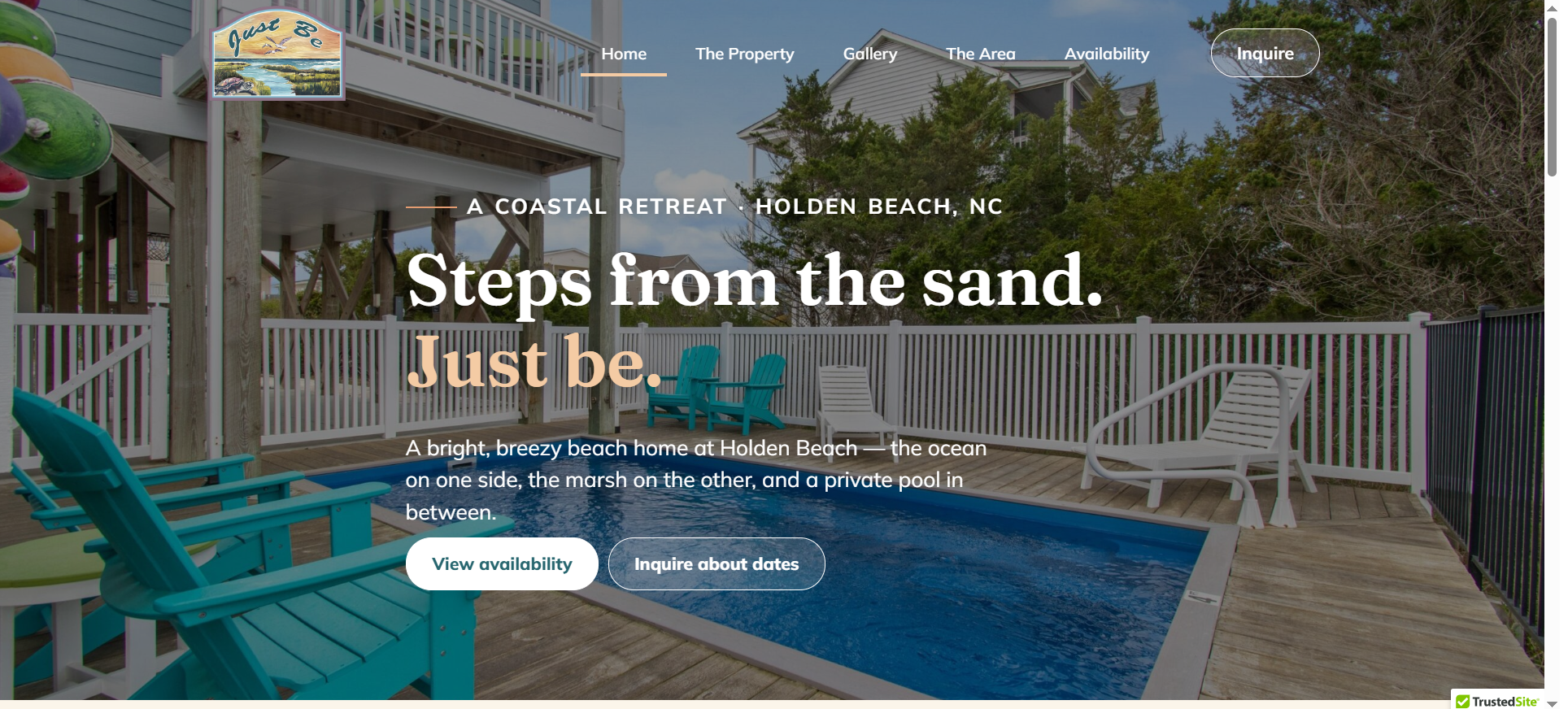
A family owns a beautiful beach home and wants to rent it out — but online booking platforms take heavy commissions, and a full booking engine feels like overkill when reservations happen by phone. That was exactly the situation behind this project. In this case study, I walk through how I built a vacation rental website for a coastal property at Holden Beach, North Carolina — a six-page WordPress build with a live availability calendar, but no payment system. I will cover the proposal, the build, the mistakes, the fixes, and the final result. If you manage a rental property, work with clients who do, or simply want an honest look at how a real project unfolds, this post is for you.
The Client & The Problem
The project came through Tammie Greene of Web Design Carolinas, who was managing the website on behalf of the property owners. The property, called Just Be, is a family vacation home at 704 Ocean Blvd West, Holden Beach, NC — a three-level house with a pool, ocean proximity, and room for a full family gathering.
Tammie's brief was refreshingly clear. She needed a standalone vacation rental website — not a listing on Airbnb or Vrbo. The owners wanted to handle reservations and payments entirely by phone, so no credit card system was needed. What the site did need was a front page with a photo slider, a property details page, a photo gallery, a contact page, and an availability page.
The Constraints
Three constraints shaped everything. First, simplicity: Tammie said from day one, "want to keep simple for now." No booking plugins, no payment gateways, no maintenance burden. Second, the availability calendar had to be something the owners could update themselves — we agreed early that Google Calendar was the right lightweight tool. Third, the hosting account contained a second, unrelated website that I was not allowed to touch, so all work had to stay carefully scoped inside the Just Be install on GoDaddy Managed WordPress.
Projects like this look easy on paper. The real challenge is delivering something polished on a modest budget without letting scope quietly balloon. That is where a disciplined process — the kind I bring to every build on my WordPress development services — makes the difference.
What I Proposed
Tammie was open on platform — she even asked whether WordPress was necessary at all. I recommended WordPress for one reason: room to grow. The site is phone-booking only today, but if the owners ever want online booking or payments later, WordPress lets us add that without rebuilding from scratch.
I sent a written project plan covering a six-page structure: Home, The Property, Gallery, The Area, Availability, and Contact. The plan laid out five phases — setup, content build, calendar and inquiry setup, review, and launch — with a check-in at the end of each phase. Putting the plan in writing did two things: it set expectations, and it gave Tammie something concrete to show the property owners.
Design-First Approval
Before building anything in WordPress, I produced the design as static HTML and recorded walkthrough videos. This let Tammie approve the visual direction quickly without waiting for a full CMS build — a workflow I use often on custom website design projects because it saves days of rework when a client wants changes.
And changes came immediately. My first concept used a dark forest green palette. Tammie's response was direct: "They will not like the dark green at all. Please replace with pastel coastal colors." She sent the logo as the reference — soft coastal tones, marsh and sunset colours. She also pushed the hero decision: "The photo of the home and its proximity to the beach should be front page. That will sell the rental." She was right. Within a day I sent a revised design, and the reply was: "MUCH better!"
The Build Process
Once the design was approved, I converted it into a working WordPress site on the GoDaddy staging URL. Here is how the key pieces came together — including the parts that did not go smoothly.
Tools and Stack
The build ran on GoDaddy Managed WordPress with a lightweight page-builder setup, optimised images throughout (the originals arrived at 59MB per photo, so compression mattered), and an embedded Google Calendar for availability. The rental agreement and legal terms were linked as PDFs rather than retyped, keeping the legal wording exactly as the owners approved it. Image optimisation and lean page weight are standard practice in my speed optimisation work, and it paid off here — most vacation rental visitors browse on a phone.
Challenge 1: The Calendar That Looked Empty
The availability calendar caused two separate scares. First, an embed briefly pulled in the wrong data. Then, days before final sign-off, Tammie reported the big one: "the calendar is no longer working properly. It pulls in to the website but it is again empty." The booked weeks were invisible to visitors.
The diagnosis: the calendar's sharing was set to private. Signed-in owners saw every booking; the public — and the website — saw a blank grid. The fix took thirty seconds in Google Calendar's settings: Make available to public → See all event details. I sent step-by-step instructions plus a screen recording, and told Tammie to verify in an incognito window, since a signed-in browser will always look correct. Her reply: "FIngers crossed. That fixed it."
Challenge 2: The Contact Form and SMTP
The inquiry form worked in testing but stopped delivering once the recipient address changed, because the server had no SMTP configuration. Getting SMTP credentials from the host would have taken time the deadline did not allow. Tammie made a pragmatic call — the owners had never liked forms on their other site anyway — so we removed the form and presented the phone number and email prominently instead. Her verdict: "I think that is the best solution. We can add it back later if they want." Sometimes the best technical solution is the simpler one.
Challenge 3: A Revision That Got Rejected
Honesty matters in case studies, so here is one that did not land. I redrew the owners' hand-sketched floor plan into a cleaner labelled graphic matching the site's palette. Tammie's feedback: "Do not use the revised floor plan. It is out of proportion, client will not like. Use the original." I swapped it back the same day. The lesson: a polished graphic is worthless if it misrepresents the actual house. Accuracy beats aesthetics on a property site.
Launch and Handoff
Going live meant pointing the real domain in GoDaddy, confirming SSL, and re-checking every photo, PDF link, map link, and the calendar on the live URL. I also walked Tammie through adding images herself, generating a print-ready QR code as a static SVG, and submitting the site to Google via a sitemap and Search Console — the kind of handoff detail I include in every website launch and SEO setup so clients are not dependent on me for basics.
The Result
The site went live at the client's own domain within the project window, on a budget of $550 for the full six-page build and revisions. The owners can update availability themselves simply by adding events to Google Calendar — no site editing required. The weekly rate ($5,800, Saturday to Saturday) sits in a plain editable text block, so pricing changes take seconds.
The client feedback speaks for itself. Mid-project: "Hello. We are very pleased! Client is reviewing with a few family members for details." And at the end: "Very pleased with the end result. A bit of a rough start with initial design but the end result was very good and client is pleased."
I include the "rough start" part deliberately. The first design missed the mark on colour. What mattered was the recovery: a full revision within 24 hours, and a client relationship strong enough that Tammie ended the project asking what other kinds of sites I build — the clearest signal of repeat business there is. That responsiveness is the standard across all of my web development services.
Key Takeaway
The biggest lesson from this project: match the technology to how the business actually operates. This client books by phone, so the website's only jobs were to sell the property visually and show accurate availability. A booking plugin would have added cost, maintenance, and failure points for zero benefit.
Three practical rules fell out of this build. Get design approval on cheap, disposable mockups before touching the CMS — the colour revision cost a day instead of a week because nothing was built yet. Test embedded third-party tools as a logged-out visitor, because a Google Calendar that looks perfect to its owner can be completely blank to the public. And when a feature fights you near a deadline, ask whether the business needs it at all — removing the contact form was a better outcome than forcing SMTP configuration under time pressure.
If you own a rental property, run a small business, or manage client sites and need a fast, honest, well-scoped WordPress build, I would love to help. Take a look at my full range of WordPress and web development services at CodeSyte, and get in touch with your project details. Whether it is a simple six-page brochure site or a full booking platform, the process you read about here — clear plan, phased check-ins, honest revisions — is exactly what you get.