
Strategy First, Then Design: How We Planned a WordPress Ministry Website Membership System Before Building a Single Page
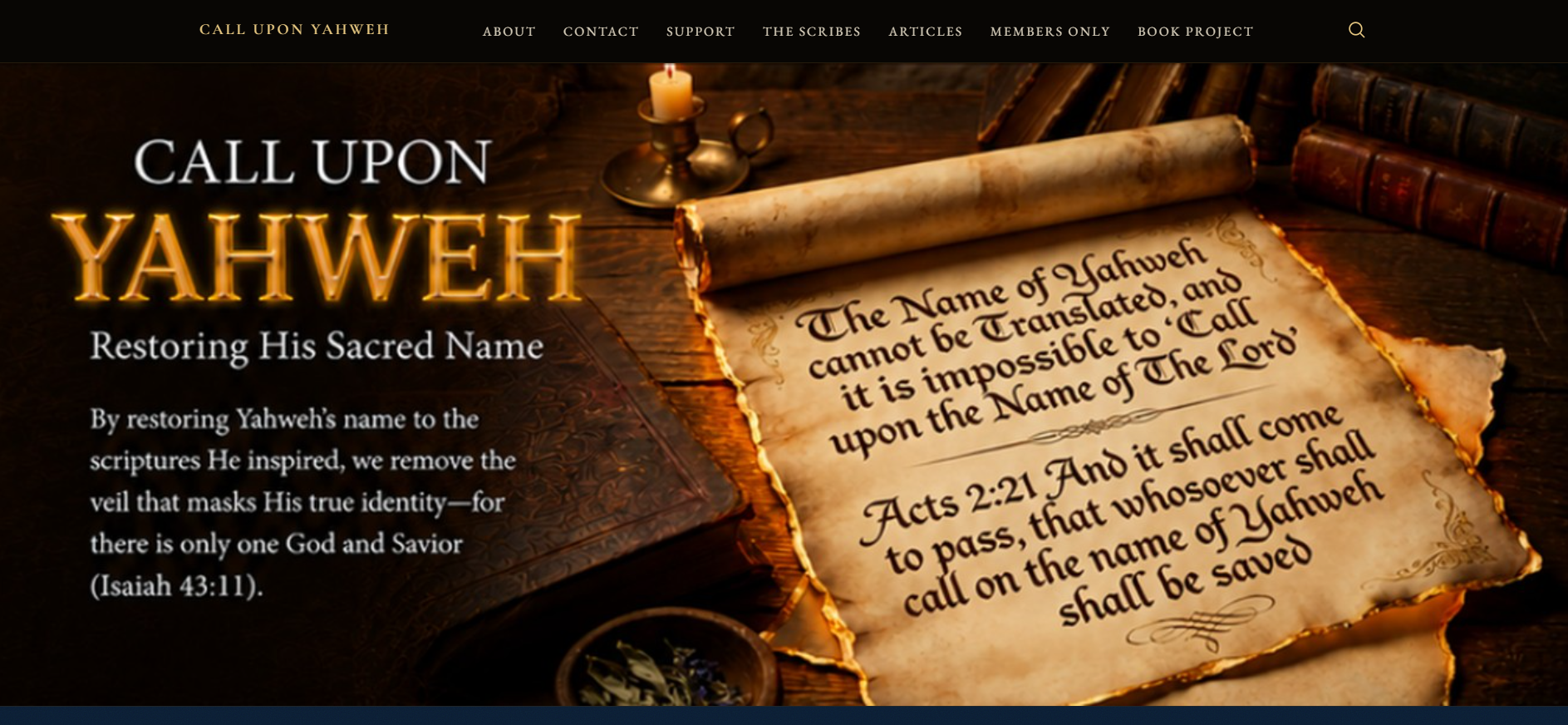
Most WordPress website projects start with design and end with strategy — if strategy happens at all. A client wants a new homepage, you build it, and six months later they realise the site is not converting visitors into subscribers or supporters. The WordPress ministry website project for Call Upon Yahweh (calluponyahweh.com) went the other way: four weeks of deep strategy conversations about membership architecture, donation flows, email automation, plugin stack, and content sequencing — before a single line of code was written. The result was a homepage design the client described as "truly stunning" and a clear phased roadmap for a full membership system build. This post covers both — the strategy that shaped the build and the design decisions that followed.
The Client and the Problem
Who They Were
John runs Call Upon Yahweh (calluponyahweh.com) — a Christian ministry website focused on biblical scripture research, sacred name theology, and an upcoming e-book project titled "The Keys to Deciphering Yahweh's Holy Scriptures Revealed." The site already had nine chapters of the e-book published as WordPress posts, a collection of member articles, and a book project page. It was hosted on Namecheap with DNS managed through Cloudflare, and was running Wordfence, Brevo (free), and WP Mail SMTP Lite — a well-considered technical foundation.
What Was Not Working
The existing homepage was built on a custom theme called "Lhotse" — a bespoke template from the previous web developer that offered limited flexibility for layout changes, Elementor-style editing, or modern membership and conversion features. The homepage was information-heavy but not conversion-focused: it did not guide visitors toward a clear next step, did not have strong calls to action, and did not have an email capture system in place.
John's original brief was to implement a dual-track payment and delivery system: Track 1 being a fixed recurring subscription using Paid Memberships Pro, and Track 2 being a Pay-What-You-Want donation form using PayPal — all without WooCommerce, to keep the database light. The budget was $250. But before any implementation happened, a much more important conversation took place: what should be built first, and why?
What I Proposed — Strategy Before Build
The Honest Conversation About Sequencing
After reviewing the site, the plugin stack, and the ministry's current stage of growth, the recommendation was direct: do not build the membership system yet. Building a subscription and donation platform before an audience exists means paying for infrastructure with no one to use it. Paid Memberships Pro at $499 per year, FuseWP at $119 per year, and Brevo Starter at $9 per month are meaningful investments for a startup ministry with no current supporter base.
The honest recommendation was a phased approach: improve the homepage first to build trust and communicate the mission clearly, grow an email list through a free lead magnet (the Ultimate Bible Study Guide offered as Chapter 2 of the e-book), promote the upcoming book, and then implement the full membership system once traction began. This sequencing advice — telling a client not to spend money on something yet — is the kind of transparency that builds long-term client relationships. It is how I approach every WordPress strategy and development project at CodeSyte.
The Plugin Stack Recommendation
For the eventual full membership build, the recommended stack was three-layered. Layer 1: Cloudflare and Wordfence for security and CDN. Layer 2: WordPress with Paid Memberships Pro, PayPal Business, a PMPro-compatible donation solution, and FuseWP. Layer 3: Brevo with WP Mail SMTP. The reasoning for each component was documented for the client in detail — including why FuseWP was recommended over WP Fusion (simpler, lower cost, built specifically for WordPress to email list syncing, with automatic status-based list swapping), and why the Brevo Starter plan at $9 per month was sufficient for the ministry's current scale.
Cloudflare caching exclusion rules were also discussed: login, registration, membership checkout, account, profile, and password reset pages all needed to be excluded from caching so members always saw real-time account data. This is a technical detail that is easy to miss on a membership site — and a common cause of login and account page problems when Cloudflare is in front of a WordPress membership install.
Mapping the Membership Architecture
Two Access Tracks Without WooCommerce
The dual-track system was mapped in detail before any plugin was touched. Track 1 Members — recurring monthly or yearly subscribers — would receive access to the /member-articles/ section and the /book-project/ page. Track 2 Supporters — Pay-What-You-Want donors — would receive access to /book-project/ only. Visitors without either status would be redirected to a registration or custom membership page.
Rather than using a standalone PayPal donation button for Track 2, the recommendation was to integrate the donation flow directly with PMPro so that a donation created a user account, granted access permissions, and triggered Brevo email automation automatically — making the whole system fully automated and scalable without manual permission management. Four Brevo segments were designed: Active Members, Active Donors, Lapsed Members, and Lapsed Donors — each triggering different email sequences appropriate to the subscriber's status and relationship with the ministry.
This kind of membership architecture planning — mapping flows before touching plugins — is exactly what prevents broken checkout experiences and missed email triggers on live sites. It is part of every WordPress membership and subscription setup at CodeSyte.
The Homepage Design Process
From Lhotse to Elementor — Framework First
The Lhotse custom theme was identified early as a constraint. Limited flexibility for layout editing, responsive adjustments, and future membership page integration made it unsuitable for the conversion-focused homepage the ministry needed. The recommendation to switch to a more flexible framework — Elementor with a lightweight base theme like Astra or Hello Elementor — was initially approached cautiously, then confirmed by the client after independent research. This framework decision unlocked everything that followed.
Homepage Structure and Conversion Logic
The homepage was designed around three visitor actions: join the email list, read the e-book content for free, and support the mission. Every section was built to guide visitors toward one of these three outcomes rather than presenting information passively.
The section structure was: a hero with a strong ministry message and dual CTAs, a Featured Articles section with a contrasting background colour, an e-book promotion section with the book cover image and "Read Chapter One Free" CTA, a "Free Download — The Ultimate Bible Study Guide" email capture section with a lantern image for warmth, a bottom section with a stone archway image and the copy "Compare modern church teachings against Scriptural Truths," and a footer with the scripture from Isaiah 45:21-23 and clear navigation links.
The design went through multiple rounds of iteration — mock screenshots, HTML previews, reference images from AI tools the client used for direction, and several Zoom calls to align on specific section changes. The animated hero text for "The Keys to Deciphering Yahweh's Holy Scriptures Revealed" was added as a subtle fade-in rather than an aggressive animation, maintaining the spiritual and professional tone the brand required. Bible verse citation wrapping — a specific typographic issue the client noticed where parenthetical citations were breaking mid-line on mobile — was flagged for custom CSS treatment during the Elementor build phase.
This kind of iterative, client-led design process — multiple rounds, reference images, Zoom calls, and a willingness to refine until the result is right — is how homepage design should work for any mission-driven brand. It is part of how I approach every WordPress homepage design and conversion optimisation project at CodeSyte.
The Result
What Was Delivered at This Stage
- Full membership architecture mapped across two access tracks with Brevo segment strategy
- Detailed plugin stack recommendation with rationale for each component
- Cloudflare caching exclusion rules documented for implementation
- Complete homepage design — multiple iterations across HTML mockups and PNG previews
- Five-section conversion homepage structure: hero, featured articles, e-book promotion, email capture, and bottom CTA
- Book cover image integrated with correct text and CTA
- Framework migration recommendation confirmed and agreed
- Full project scope confirmed at $650 for complete redesign, internal page updates, Brevo integration, and Phase 2 membership build
Client Feedback
The client left a five-star review: "It has been a pleasure working with Tallha. He is incredibly knowledgeable and demonstrated a clear understanding of my vision for the new ministry website. His advice was invaluable, and the pricing was very reasonable. The homepage design we developed is truly stunning, and his responsiveness and expertise have consistently exceeded my expectations." All three delivery scores — communication, quality, and value — were rated five stars.
It is worth noting that a significant personal loss occurred during this project — a family bereavement — and the client responded with warmth and patience: "You should have focused on your friends and family; this project could have waited. I'm so sorry for your loss, my friend." The updated homepage design was delivered the following day regardless. The relationship built through honest strategy advice, transparent communication, and consistent delivery through difficult personal circumstances is what produces feedback like this.
Key Takeaway for Ministry and Non-Profit WordPress Sites
Build the Audience Before the Membership Platform
A membership system is only as valuable as the audience it serves. Paid Memberships Pro, FuseWP, and Brevo Starter are excellent tools — but investing in them before any subscriber base exists is paying for infrastructure with no users. For any ministry, non-profit, or content creator at the early stage of audience building, the correct sequence is: homepage that converts visitors into subscribers, free lead magnet that gives people a reason to join the list, email sequence that builds trust and communicates mission, and then membership platform once the audience is established enough to sustain it.
A Strategy Conversation Is Worth More Than a Plugin Setup
The most valuable work on this project happened before any plugin was installed. Mapping the membership architecture, choosing FuseWP over WP Fusion with a clear rationale, documenting the Cloudflare caching rules, designing the Brevo segment structure, and recommending a phased build order — all of this shaped the entire project and saved the client from spending money on the wrong things at the wrong time. If your developer goes straight to plugin installation without asking about your audience, your current growth stage, and what you want visitors to do when they land on your site, that is a red flag.
Framework Choice Determines Future Flexibility
The Lhotse custom theme was not broken — it was limiting. A site built on a bespoke custom theme without a major page builder is a site where every design change requires a developer, every layout update is harder than it needs to be, and every future membership or integration feature adds complexity. Switching to Elementor with a lightweight base theme early in the redesign process unlocks every future improvement — responsiveness, membership page layouts, conversion sections, A/B testing, and plugin compatibility. The framework decision is the most important technical choice on any WordPress site that needs to grow.
Final Thoughts
The Call Upon Yahweh project is the clearest example in this portfolio of why strategy comes before execution. Four weeks of planning, architecture mapping, and design iteration produced a homepage the client called stunning and a phased roadmap that protects the ministry's investment by building only what is needed at each stage. The full membership system, Brevo automations, and internal page redesigns are the next phase — built on a foundation that was designed to support them.
If you are running a ministry, church, or non-profit and need a WordPress website that builds your audience before it asks for their money — with honest advice about what to build when — that is exactly what I do at CodeSyte. Explore my full WordPress membership, ministry, and homepage design services here, or get in touch directly for a strategy conversation before we agree on anything else.