
How I Added a Required Terms of Service, Privacy Policy, and Age Confirmation Checkbox to a WordPress Registration Page
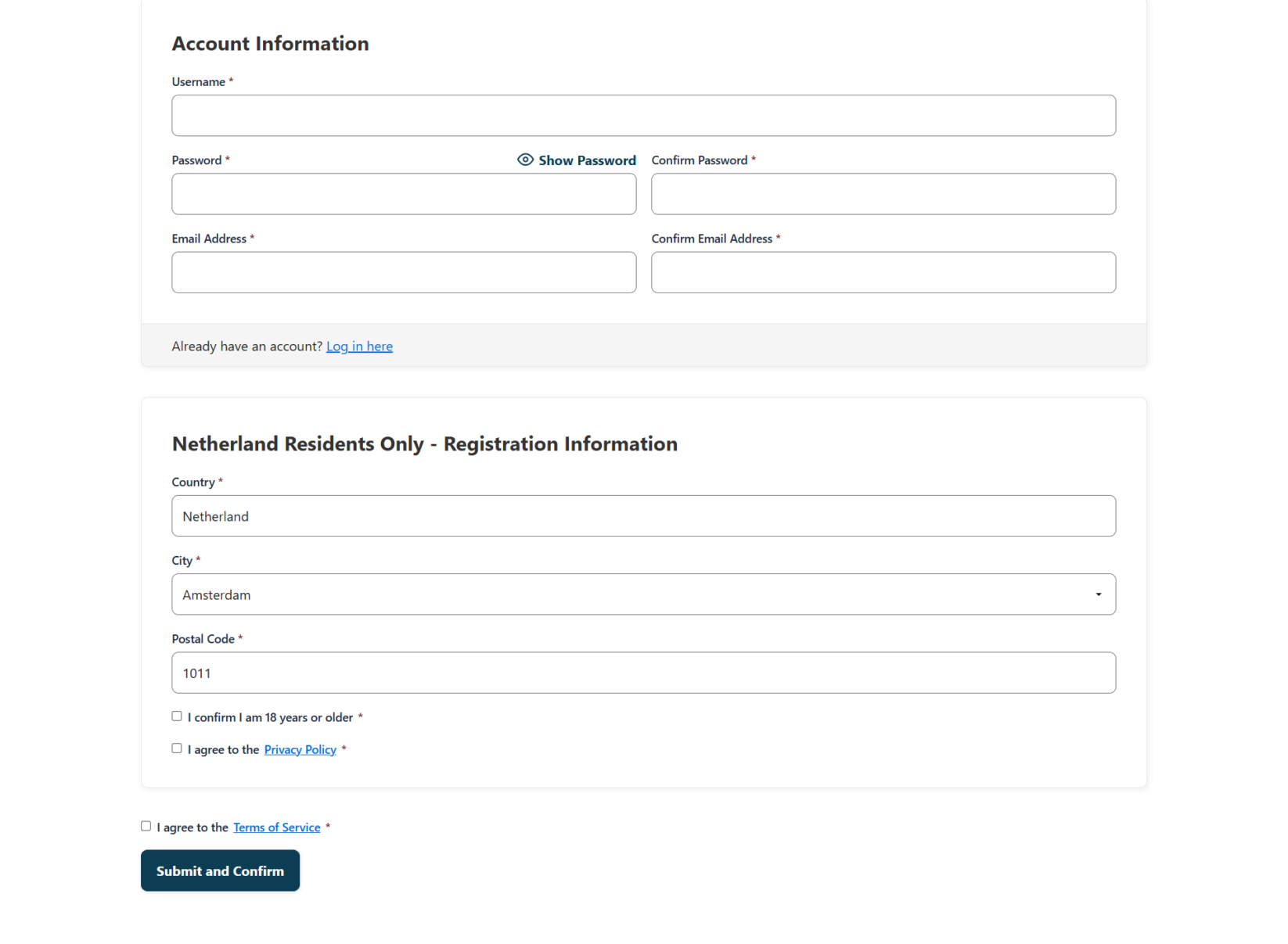
Picture this: you run a membership or subscription website, and a new user signs up without ever confirming they're old enough to join or agreeing to your Terms of Service. If a dispute ever comes up, you have nothing to point to — no record, no consent, no proof. That's exactly the gap a recent client came to me to close.
This post walks through a real client project where I added a WordPress registration checkbox setup — Terms of Service, Privacy Policy, and age confirmation — to an existing membership site. I'll cover the request, my approach, the build process (including two tricky bugs that came up during testing), and the final result.
This case study is for WordPress site owners, membership site operators, and freelance developers who want to see what a legal-compliance checkbox implementation actually looks like in practice — bugs and all.
The Client & The Problem
The client, who I'll refer to by their project handle "bupartner," runs a WordPress-based membership and subscription site. They had a working registration flow, but it was missing three things that most membership platforms need before they can legally and safely onboard users:
- A Terms of Service agreement checkbox
- A Privacy Policy agreement checkbox
- An age confirmation checkbox (18 years or older)
None of these existed on the registration form. That meant anyone could create an account without ever acknowledging the site's policies or confirming their age — a real liability gap for a membership business collecting personal data and, potentially, payments.
The client had mentioned this requirement earlier in our conversation, so when they were ready to move forward, they came back with a clear ask: get these three checkboxes onto the registration page, make them required, and link two of them to the actual policy pages.
What I Proposed
Before touching any code, I scoped the work clearly so there'd be no confusion about what was and wasn't included. Here's what I proposed:
In scope:
- Add three checkboxes to the registration form: Terms of Service, Privacy Policy, and age confirmation
- Make all three required, so a user physically cannot submit the form without checking them
- Link the Terms of Service and Privacy Policy checkboxes to their respective live pages
- Test the full registration flow end-to-end
Out of scope:
- Writing the actual legal text for the Terms of Service or Privacy Policy — this needed to come from the client or a policy generator
- Any changes outside the registration page itself
I quoted $60 with a 1–2 day timeline, which fit comfortably within the client's budget. Once they were ready, I sent a custom Fiverr offer for a WordPress redesign/configuration package, and we confirmed scope one more time in writing before I received site access — a step I always recommend, since it saves both sides from misaligned expectations later.
The Build Process
Once I had WordPress admin access, I asked for two remaining pieces:
- The client's actual Terms of Service and Privacy Policy pages (they sent direct links:
duurzaamruil.nl/privacy-policy/andduurzaamruil.nl/terms-of-service/) - The exact wording for the age confirmation checkbox ("18 years old")
With those in hand, I built out the three checkboxes on the registration form, wired the required validation, linked the two policy checkboxes to their pages, and set the form to record each user's consent on their profile — so the site owner has a timestamped record of who agreed to what.
Testing is where the real work happened. Three separate issues surfaced during client testing:
- Unresponsive checkboxes — the age confirmation and Privacy Policy checkboxes weren't clickable at all. This turned out to be a front-end rendering issue that needed a quick fix.
- Validation bypass — even when a user left the boxes unchecked and got the "required" warning, the account was still being created in the background. This is a classic front-end/back-end mismatch: the visual validation was blocking the button, but the server-side form handler wasn't actually enforcing the same rule.
- False rejection — after fixing the bypass, checking all three boxes still triggered the "please check required boxes" error. Digging into this, the checkbox fields were being submitted under different internal field names than the validation script expected, so the server-side check couldn't "see" that they were ticked.
Each of these got resolved one at a time, with the client re-testing after every fix — a good reminder that checkbox validation on WordPress forms often fails silently on the back end even when the front end looks correct.
The Result
After the final fix, the registration flow worked exactly as intended:
- All three checkboxes are visible, clickable, and required
- Leaving any one unchecked blocks registration completely — no account is created in the background
- Checking all three lets the user through, and their consent is logged on their profile
- The Terms of Service and Privacy Policy links open the correct pages so users can actually read them before agreeing
I tested the flow end-to-end multiple times and cleaned up all the test accounts created during debugging, so the client's user database stayed clean.
What I Learned / Key Takeaway
The biggest lesson from this project wasn't about checkboxes — it was about never trusting front-end validation alone. A form can look completely broken to a client (buttons not responding, warnings that won't clear) while the real problem is happening silently on the server side, where accounts get created regardless of what the front end shows.
The second lesson: field names matter more than they should. When a checkbox's internal name attribute doesn't match what your validation script is looking for, everything can appear correct in the browser while the actual check quietly fails. Catching this required deliberately testing both failure paths (unchecked boxes AND checked boxes), not just the "happy path."
For anyone adding compliance checkboxes to a WordPress registration form, the takeaway is simple: test the negative case as thoroughly as the positive one. A checkbox that "looks required" isn't the same as one that's actually enforced.
Final Thoughts
Small compliance features like a Terms of Service or age confirmation checkbox can seem trivial, but they carry real legal weight for membership and subscription sites — and, as this project showed, they're easy to get subtly wrong without careful testing. If you're running a WordPress membership site and need registration compliance features like this built or audited, check out our WordPress development services for help getting it right the first time.