
How I Built a WordPress Tutoring Website With a Booking System for an Online GCSE Maths Tutor
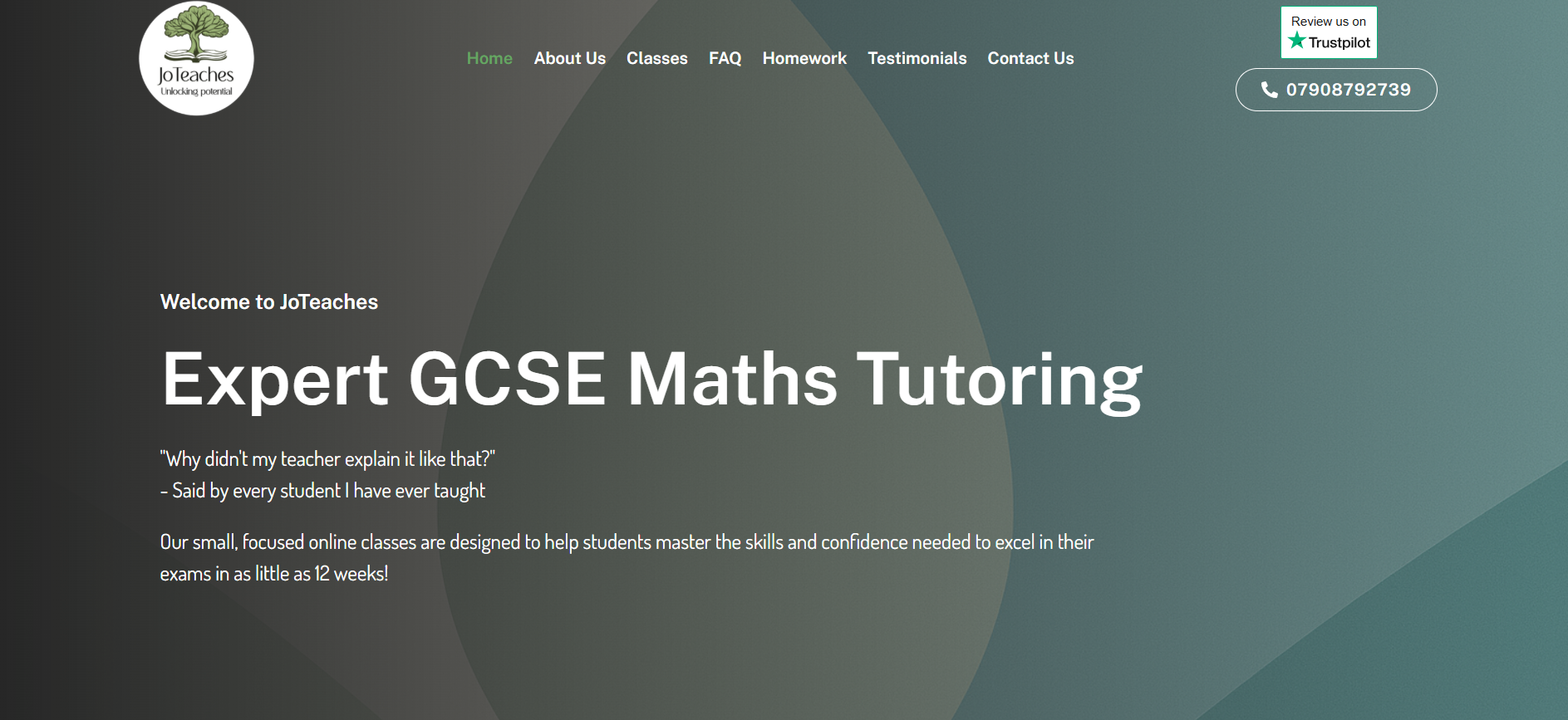
Plenty of great tutors get stuck at the same wall. They know their subject inside out, but the tech side of going online feels impossible. That was exactly the case here. In this post I break down how I built a WordPress tutoring website with a booking system for Johanna, a UK-based Edexcel GCSE Higher Maths tutor who had zero web experience. I cover the full build: buying hosting, designing six pages, wiring up payments, and the honest part most case studies skip — how the booking system changed direction three times before it fit her real needs. This is for tutors, coaches, and course creators who want a working site without the jargon, and for developers who want a realistic look at scoping a project for a non-technical client.
The Client & The Problem
Johanna runs online Edexcel GCSE Higher Maths tutoring and wanted to shift her business fully online. She reached out through Fiverr with a detailed brief. She needed a professional, responsive site with a booking system for group classes, secure payments, and a clean, minimalist design.
The pages she listed were Home, About, Classes, Booking, Testimonials, and Contact. On paper it was a standard tutoring site. The real challenge sat underneath the brief.
Johanna was a complete beginner. In her own words, she had "zero expertise in this area." She did not own a domain, had no hosting, and had never touched a WordPress dashboard. So the project was never just a build. It was also a guided setup where I had to make every step simple and safe for someone new.
She also had a fixed constraint. She could only pay on a set date in June, so the timeline had to flex around her cash flow. That meant building quietly in the background and keeping the site private until she was ready.
What I Proposed
I scoped the work at $420 with a realistic delivery window rather than the rushed default. I was upfront that a proper booking and payment build takes time to do well.
My proposal covered complete design and development, full responsiveness across devices, and basic SEO setup so the site could be found. Because she was new, I added something not in the brief: a step-by-step handhold through buying a domain and hosting.
I pointed her to Namecheap for the domain and EasyWP Turbo for managed WordPress hosting. Both are beginner-friendly and cheap to run. This kind of platform decision is central to my WordPress development services, because the wrong host makes everything harder later.
I also promised to keep the site private until her payment date, then flip it live in a couple of days. That removed all pressure from her end.
The Build Process
The build ran in clear phases. Some went smoothly. One phase taught me the most valuable lesson of the whole project.
Setting Up Hosting and WordPress for a Non-Technical Client
Once Johanna bought her domain and EasyWP Turbo plan, I connected everything for her. I logged in, linked the domain to the hosting, installed WordPress, and set up an SSL certificate for security.
This is where guiding a beginner matters. I walked her through each action in plain language and never assumed prior knowledge. A smooth, secure foundation is the quiet groundwork behind every reliable site, and it links directly to the speed and SEO optimisation work I do on every project.
Designing the Pages With Elementor and Divi
Johanna wanted neat and minimalist, with a menu on the right and a clean home page. She shared a reference site she liked, which gave me a clear direction.
I built the six pages with a focus on clarity over clutter. I used stock maths and tutoring visuals as placeholders and left a blank circle for her profile photo beside the About section, exactly as she asked. The Classes page later grew to include full session names and learning outcomes across all 24 sessions.
Building (and Rebuilding) the Booking System
This is the honest heart of the project. The original brief asked for a group booking calendar for 5 to 20 students with automated reminders and payment.
I built a weekly calendar so students could see available slots. But once Johanna saw it live, her feedback was direct: "the booking page is just way too confusing." Her actual business model was simpler than the brief suggested.
So we pivoted. First to a single one-off purchase for her Tuesday and Friday class, with the calendar hidden. Then further still. She realised she preferred to send invoices privately and just needed a prices page where students could see her rates and contact her. Rebuilding this kind of custom WooCommerce and booking setup takes real time, because changing the checkout flow means redoing the functionality underneath it.
I explained that trade-off clearly and did the rework anyway. The final result matched how she actually wanted to sell, not how the brief was first written.
Payments, Course Packages, and Extra Requests
Johanna wanted Klarna so students could pay in three instalments, alongside standard payment methods. I set up the course packages and pricing to display cleanly, and connected her live classes to Zoom.
Requests kept arriving as she saw the site grow: a Testimonials page mixing her uploaded reviews, a homework section covering 24 topics, centred images, a Trustpilot link, and mobile formatting fixes. Handling steady change requests like these is part of building course and membership-style sites for real businesses.
Handling Delays and Revisions Honestly
Two delays hit outside anyone's control. Eid holidays paused things briefly, and Johanna had a family emergency one week. On top of that, Fiverr auto-completed the order when the delivery clock ran out.
I told her plainly that the order status did not change my commitment. I stayed fully responsible and kept doing every requested change afterward. Trust matters more than a system timer.
The Result
Johanna's site went live at joteaches.co.uk — a clean, responsive WordPress site with Zoom-linked live classes, a clear prices and enquiry flow, course packages, testimonials, homework, and SEO groundwork in place.
She left a 5-star review that captured the experience:
"Tallha was amazing to work with, he always responded very quickly. He went above and beyond with the website I requested and continued to help me with updates and changes even after the order was complete. I will never look anywhere else for coding/web design help."
The relationship did not end at delivery. Weeks later she was still coming back with new ideas, like adding a blog space for parents and students. That ongoing trust is the outcome I value most from my WordPress build and support services.
Key Takeaway
The biggest lesson was simple. Build for how the client actually works, not for the fanciest feature in the brief. The complex booking calendar looked impressive but confused her and her students. The stripped-back prices-and-invoice model won because it fit her real routine.
For non-technical clients, guidance is part of the product. Walking Johanna through domains, hosting, and dashboards mattered as much as the code. A confident client uses their site well.
And scoping a booking system deserves extra care. Ask exactly how someone sells before building the checkout, because reworking payment flows later costs real time. Getting that question right early saves everyone effort.
If you are a tutor, coach, or course creator who wants a site that matches how you really work, this is the kind of build I do every week. You can explore my full range of WordPress development and optimisation services and get in touch to start your own project. I will guide you from an empty domain to a live, working website — no jargon required.